Error Establishing a Database Connection
If you see the error “Error establishing a database connection” in the OpenAdmin interface, it indicates that the database connection has failed.
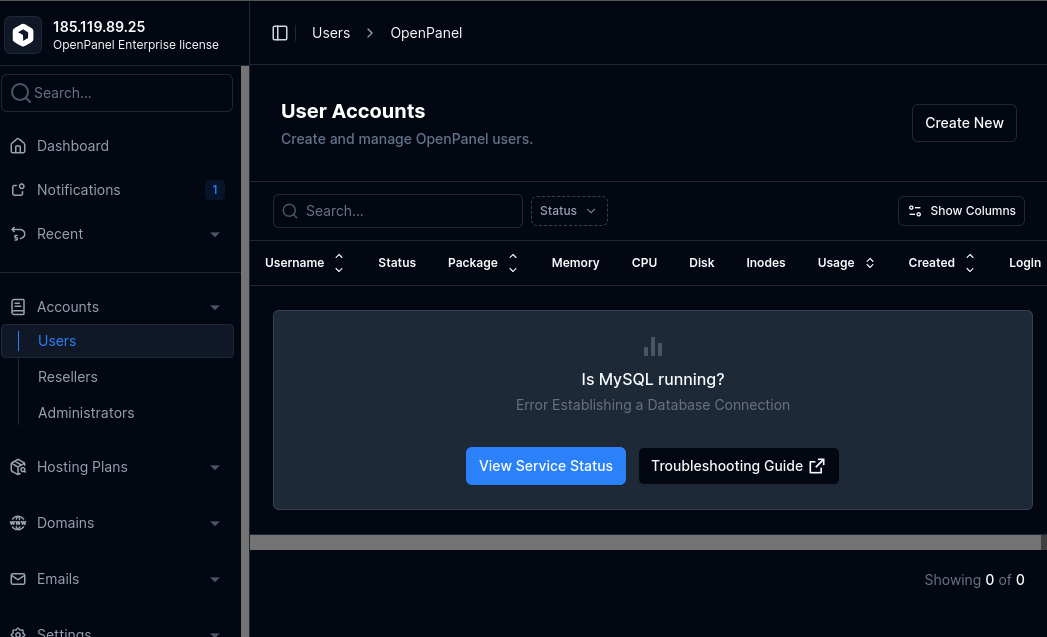
MySQL Service
OpenPanel and OpenAdmin use a MySQL Docker service defined in /root/docker-compose.yml.
First, ensure that the service is running:
From OpenAdmin:
- Go to Services > Services Status.
- Check the status of the MySQL service.
- Restart it from this page if necessary.
From the terminal:
docker ps -a
Look for the openpanel_mysql service in the output.
MySQL Fails to Start
If the MySQL service fails to start, Docker will keep restarting it. You can observe this from the docker ps -a output.
Example:
root@openpanel:~# docker ps -a
CONTAINER ID   IMAGE                COMMAND                  CREATED          STATUS                          PORTS     NAMES
6d9885164cba   mysql/mysql-server   "/entrypoint.sh mysql…"   30 minutes ago   Restarting (1) 22 seconds ago             openpanel_mysql
- If the uptime is only a few seconds and the status shows not running or unhealthy, check the service logs:
docker logs -f openpanel_mysql
Example:
root@openpanel:~# docker logs -f openpanel_mysql
[Entrypoint] MySQL Docker Image 8.0.32-1.2.11-server
[Entrypoint] Starting MySQL 8.0.32-1.2.11-server
2025-10-17T15:36:55.291441Z 0 [Warning] [MY-011068] [Server] The syntax '--skip-host-cache' is deprecated and will be removed in a future release. Please use SET GLOBAL host_cache_size=0 instead.
2025-10-17T15:36:55.293565Z 0 [System] [MY-010116] [Server] /usr/sbin/mysqld (mysqld 8.0.32) starting as process 1
2025-10-17T15:36:55.304336Z 1 [System] [MY-013576] [InnoDB] InnoDB initialization has started.
2025-10-17T15:36:55.546466Z 1 [System] [MY-013577] [InnoDB] InnoDB initialization has ended.
2025-10-17T15:36:55.852133Z 0 [Warning] [MY-010068] [Server] CA certificate ca.pem is self signed.
2025-10-17T15:36:55.852166Z 0 [System] [MY-013602] [Server] Channel mysql_main configured to support TLS. Encrypted connections are now supported for this channel.
2025-10-17T15:36:55.852534Z 0 [ERROR] [MY-010259] [Server] Another process with pid 60 is using unix socket file.
2025-10-17T15:36:55.852547Z 0 [ERROR] [MY-010268] [Server] Unable to setup unix socket lock file.
2025-10-17T15:36:55.852555Z 0 [ERROR] [MY-010119] [Server] Aborting
2025-10-17T15:36:57.431776Z 0 [System] [MY-010910] [Server] /usr/sbin/mysqld: Shutdown complete (mysqld 8.0.32)  MySQL Community Server - GPL.
In this example, error is: Another process with pid 60 is using unix socket file.
Googling the error we get the solution: cd /root && docker compose down --volumes NOTE: this will remove all existing mysql data including users, plans, domains.. only run it on a fresh installation, ie. if this mysql error occurs after installing openpanel.
Copy any error messages and search online. Common issues include:
- Problem with the latest mysql docker image tag
- MySQL not running properly on ARM CPUs
MySQL command not working
You can test the connection directly from the terminal using the mysql command.
Example error:
root@openpanel:~# mysql
ERROR 2026 (HY000): TLS/SSL error: SSL is required, but the server does not support it
To resolve this error TLS/SSL error: SSL is required, but the server does not support it run: echo "skip-ssl = true" >> /etc/my.cnf SOURCE
Example error:
root@openpanel:~# mysql
ERROR 2003 (HY000): Can't connect to MySQL server on '127.0.0.1:3306' (111)
If this is a fresh installation and there are no users or plans yet, MySQL may fail to initialize during setup. To fix this:
cd /root
docker compose down
docker volume rm root_mysql # DANGER: this will delete all users and plans, only run it on a fresh install!
docker compose up -d openpanel_mysql openpanel
Otherwise, check if credentials stored in /etc/my.cnf are correct:
root@demo:~# cat /etc/my.cnf
[client]
user = panel
database = panel
password = e391ac94321d110c
host = 127.0.0.1
protocol = tcp
Firewall
Outgoing connections on port 3306 must be allowed. Ensure this port is open in the Sentinel Firewall (CSF).
Check /etc/csf/csf.conf for the TCP_OUT= setting and confirm that port 3306 is included. If not, add it and restart CSF:
csf -r
If none of these steps resolve the issue, contact us via the forums or open a support ticket, and we will help troubleshoot the problem.