Start Here
Domain Management
403 Error Troubleshooting Guide
502 Error Troubleshooting Guide
Domain Shows Default Page
504 Error Troubleshooting Guide
Adding Additional Hosts to SPF Records
Configure Nameservers
How to Enable HSTS on a Domain in OpenPanel
DNS Clustering
404 Error Troubleshooting Guide
Speed up DNS propagation
Troubleshooting Guide: Caddy / Let’s Encrypt SSL Validation Failure
Troubleshooting DNS
Websites
OpenPanel Cron Troubleshooting Guide
Google PageSpeed Insights API Key
Hosting a PHP Website with OpenPanel
Hosting a Static Website with OpenPanel
How to install a PHP extension in OpenPanel
How to Install WordPress® With OpenPanel
How to set or increase PHP INI memory_limit or other values?
How to Migrate a WordPress® Installation to OpenPanel
PHP settings per website (folder)
Purging Varnish Cache
Sharing .htaccess rules
WordPress Themes and Plugins Sets
Email
Setup DKIM
How to Set Up Email in Gmail
How to Set Up Email on Android (Gmail App)
How to Set Up Email on Apple Mail (Mac)
How to Set Up Email on iPhone
How to Set Up Email on Outlook 365 (Desktop App)
How to Set Up Email on Thunderbird
Setup Fail2ban
How to setup your email client
Offload Email Storage to a Remote NFS Server
IMAP vs POP3
RSPAMD GUI
Email Errors
Docker
Hard Limits
Managing User Containers from the Terminal
User Isolation
Adding custom docker images for OpenPanel users
Unlimited CPU&RAM
MySQL, MariaDB, or Percona
Apache, Nginx, OpenResty, OpenLiteSpeed, and Varnish
Troubleshooting service issues with OpenPanel
How Web Traffic Flows with User Containers
Using Varnish with WordPress
Importing a Database
Network Isolation in OpenPanel
Troubleshooting Caddy Webserver
Volume Management in OpenPanel
Install & Updates
Creating an OpenPanel ISO Image
Check Version
Disable Updates
Enable Updates
Manually Update
Installation on AWS EC2
OpenPanel Installation on DigitalOcean
OpenPanel Installation on Google Cloud
OpenPanel Installation on Microsoft Azure
Installing OpenPanel on Virtualizor
OpenPanel Installation on Vultr
Installing OpenPanel via Ansible
Installing OpenPanel via Cloud-Init
Installing OpenPanel
Main IP in OpenPanel
OpenPanel Post-install script
Skip Update
Developer Experience
Custom Section
Custom Services
Add Custom Steps to the Onboarding Wizard
Auto-start Services
Custom OpenPanel Templates
Custom Plugins
Branding & White-Label
Disable Reboot within OpenAdmin
Disable Terminal within OpenAdmin
Disable Terminal within OpenPanel
Access OpenAdmin
Access OpenPanel
Restrict OpenAdmin
OpenAdmin API Documentation
Keyboard Shortcuts
OpenCLI Hooks
OpenPanel Folder Structure
Services
Limit OpenPanel
Removing the Port for OpenAdmin
Removing the Port for OpenPanel
Screenshots API
Temporary Links API
Set a separate domain for OpenPanel UI
Troubleshooting OpenPanel
Enterprise edition
Version: 2.0.7
How do I cancel my license in the my.openpanel.com?
To cancel a license purchased through the my.openpanel.com website, follow the steps below:
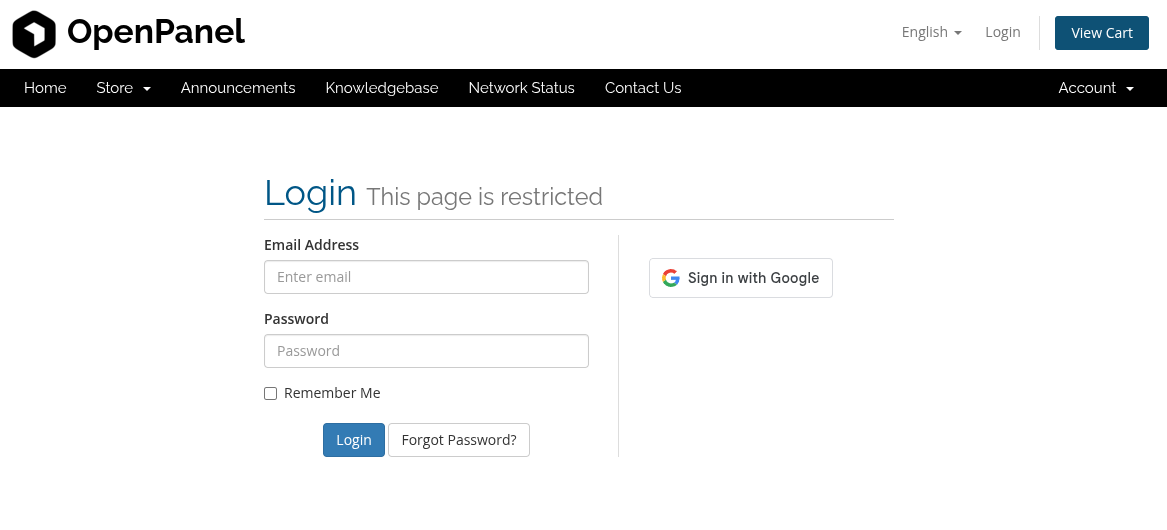
- Log in to your my.openpanel.com account.
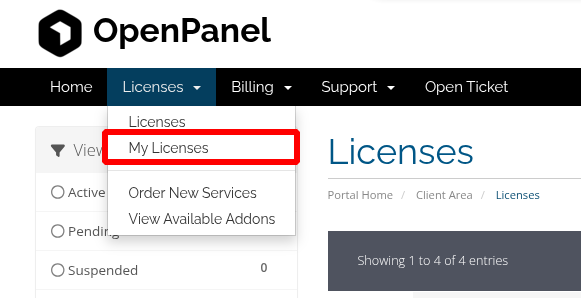
- Navigate to Licenses, then click My Licenses.
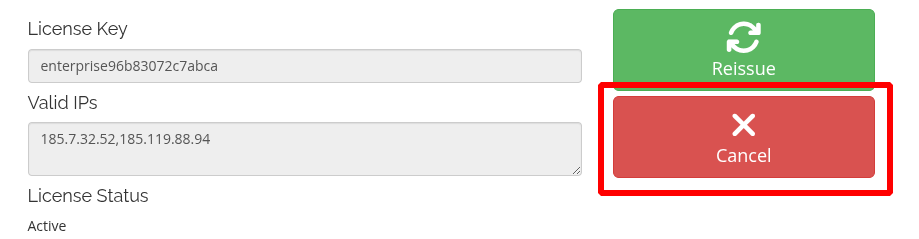
- Click on Active next to the license you wish to cancel.

- Click Cancel.
- Click on Request Cancellation.
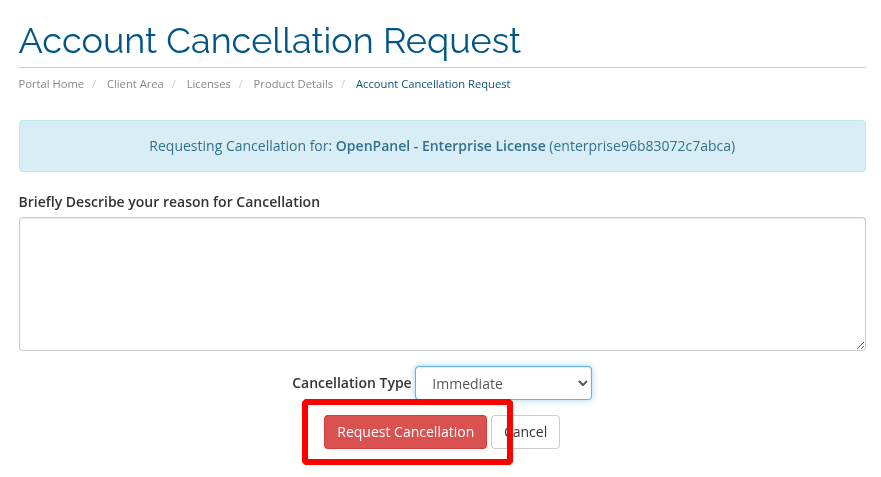
- If Immediate is selected: your license will be immediately terminated.
- If End of billing period is selected: your license will be terminated at the end of the billing period and tou will no longer receive invoices for it.
Was this helpful?