Start Here
FAQ
Domain Management
403 Error Troubleshooting Guide
502 Error Troubleshooting Guide
Use Cloudflare with OpenPanel
Domain Shows Default Page
504 Error Troubleshooting Guide
Adding Additional Hosts to SPF Records
Configure Nameservers
How to Enable HSTS on a Domain in OpenPanel
DNS Clustering
Install a Custom / Paid SSL Certificate
Let's Encrypt Rate Limits & Renewals
404 Error Troubleshooting Guide
Redirects: HTTPS, www, Domain
Speed up DNS propagation
SSL Validation Failure
Subdomains, Addon & Parked Domains
Troubleshooting DNS
Wildcard SSL Certificates
Websites
Change PHP Version per Domain
OpenPanel Cron Troubleshooting Guide
Deploy a Django App
Deploy a Flask App
Deploy a Java / Spring Boot App
Deploy a Laravel App
Deploy a Node.js / Next.js App
Deploy a Ruby / Rails App
Google PageSpeed Insights API Key
Hosting a PHP Website with OpenPanel
Hosting a Static Website with OpenPanel
How to install a PHP extension in OpenPanel
How to Install WordPress® With OpenPanel
How to set or increase PHP INI memory_limit or other values?
How to Migrate a WordPress® Installation to OpenPanel
Password-Protect a Directory
PHP settings per website (folder)
Purging Varnish Cache
Sharing .htaccess rules
WordPress Themes and Plugins Sets
Redis Object Cache for WordPress
WordPress Staging Site
WordPress White Screen / Critical Error
Use WP-CLI
Email
Set Up DMARC
Setup DKIM
How to Set Up Email in Gmail
How to Set Up Email on Android (Gmail App)
How to Set Up Email on Apple Mail (Mac)
How to Set Up Email on iPhone
How to Set Up Email on Outlook 365 (Desktop App)
How to Set Up Email on Thunderbird
Setup Fail2ban
How to setup your email client
Offload Email Storage to a Remote NFS Server
IMAP vs POP3
Port 25 Blocked: Use an SMTP Relay
Set Up Reverse DNS (PTR)
RSPAMD GUI
Test Your Email with mail-tester
Email Errors
Why Emails Go to Spam
Containers
Hard Limits
Managing User Containers from the Terminal
User Isolation
Adding custom container images for OpenPanel users
Unlimited CPU&RAM
MySQL, MariaDB, or Percona
Apache, Nginx, OpenResty, OpenLiteSpeed, and Varnish
Troubleshooting service issues with OpenPanel
How Web Traffic Flows with User Containers
Using Varnish with WordPress
Importing a Database
Network Isolation in OpenPanel
Restart a Service with a Cron Job
Troubleshooting Caddy Webserver
Volume Management in OpenPanel
Install & Updates
Creating an OpenPanel ISO Image
Check Version
Disable Updates
Enable Updates
Manually Update
Installation on AWS EC2
OpenPanel Installation on Contabo
OpenPanel Installation on DigitalOcean
OpenPanel Installation on Google Cloud
OpenPanel Installation on Hetzner
OpenPanel Installation on a Home Server
OpenPanel Installation on Linode (Akamai)
OpenPanel Installation on Microsoft Azure
OpenPanel Installation on Oracle Cloud
OpenPanel Installation on OVHcloud
OpenPanel Installation on Proxmox
OpenPanel Installation on Raspberry Pi
Installing OpenPanel on Virtualizor
OpenPanel Installation on Vultr
Installing OpenPanel via Ansible
Installing OpenPanel via Cloud-Init
Installing OpenPanel
Main IP in OpenPanel
OpenPanel Post-install script
Skip Update
System Requirements & Sizing
Developer Experience
Custom Section
Custom Services
Add Custom Steps to the Onboarding Wizard
Auto-start Services
Customizing OpenAdmin Email Templates
Branding & White-Label
Disable Reboot within OpenAdmin
Disable Terminal within OpenAdmin
Disable Terminal within OpenPanel
Access OpenAdmin
Access OpenPanel
Restrict OpenAdmin
OpenAdmin API Documentation
Keyboard Shortcuts
OpenCLI Hooks
OpenPanel Folder Structure
Services
Limit OpenPanel
Removing the Port for OpenAdmin
Removing the Port for OpenPanel
Screenshots API
Temporary Links API
Set a separate domain for OpenPanel UI
Troubleshooting OpenPanel
Server Management
Add Extra IP Addresses
Change Server Hostname or IP
Cloudflare Tunnel + OpenPanel
High CPU or RAM: Find the Culprit
Add or Resize Swap
How To Free Up Disk Space
Setting Custom SSL Certificates for OpenPanel, OpenAdmin, and Webmail
Setting the Max Processes (PIDs) Limit for a User
OpenAdmin System Crons
Cached data in OpenPanel UI
Enterprise edition
Version: 2.0.15
How to Host a Static HTML Website
This guide walks you through hosting a static website on OpenPanel.
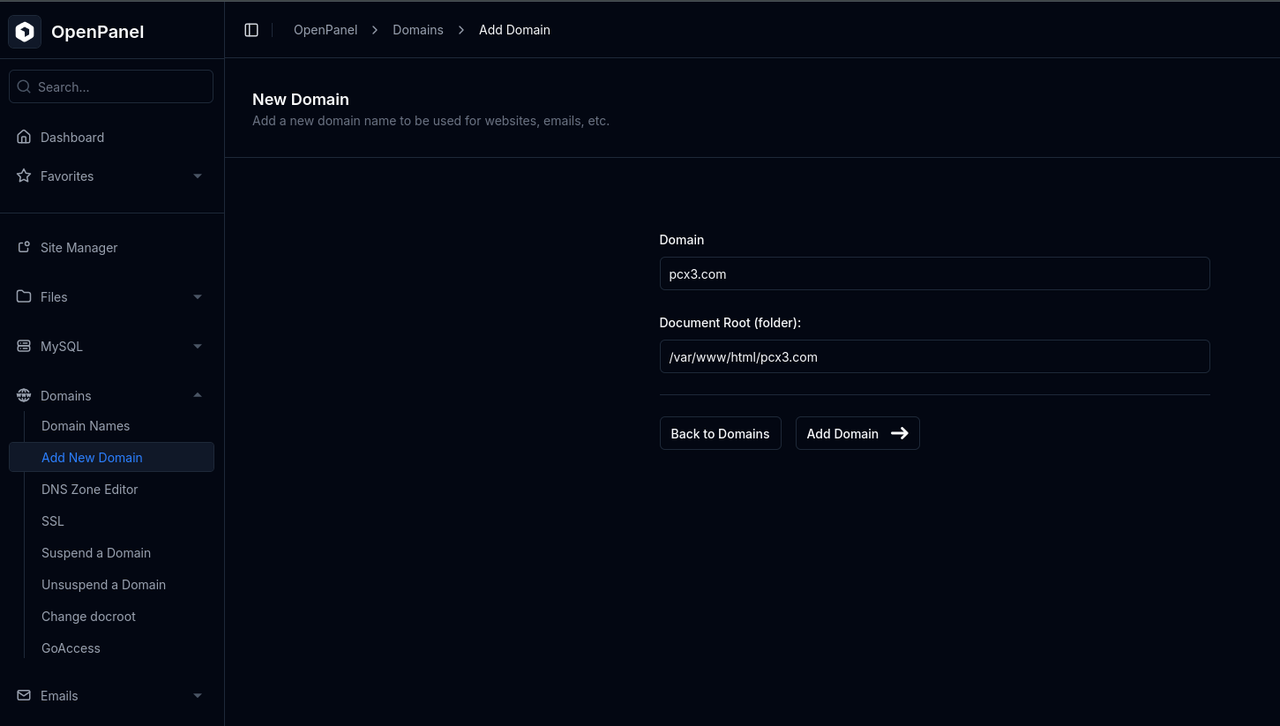
Step 1 — Add a Domain
- Go to OpenPanel → Domains → Add New Domain.
- Enter your new domain name and click Add Domain.
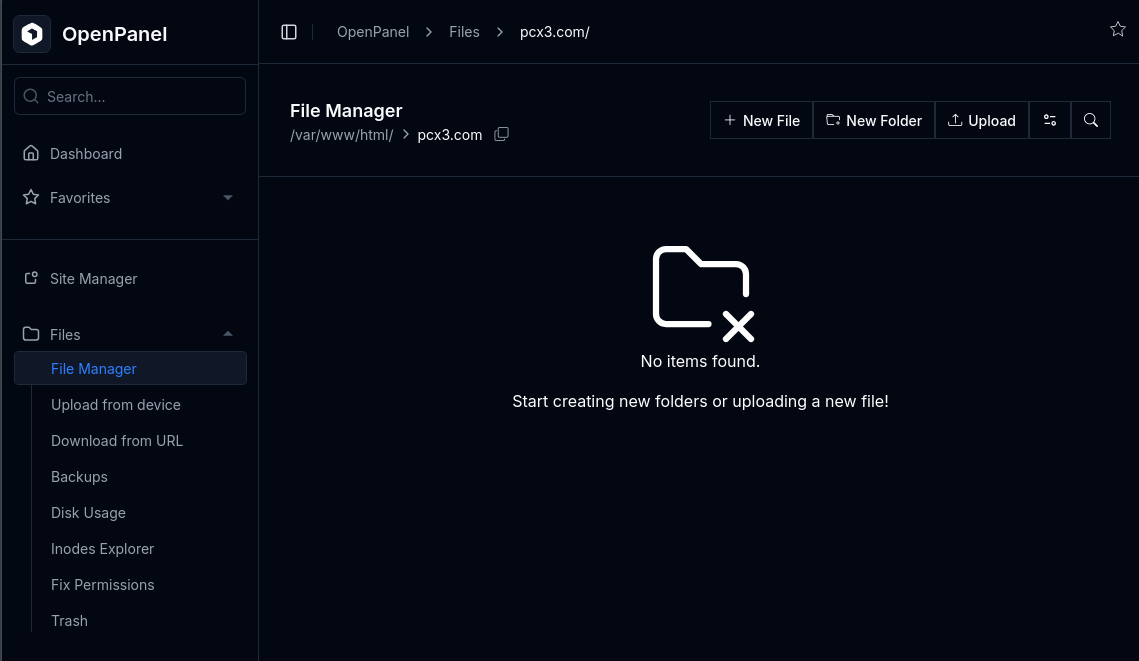
Step 2 — Upload Your Files
- Open OpenPanel → File Manager.
- Navigate to your domain’s directory.
- Click Upload to select files from your device, or choose Download from URL to fetch files from an external source (e.g., GitHub).
Step 3 — Test Your Website
- Visit your domain using
https://to trigger SSL generation. - Your static site should now be live and visible immediately.