How to Deploy a Ruby App (Sinatra or Ruby on Rails)
This guide shows how to host a Ruby web application on OpenPanel - a small Sinatra app or a full Ruby on Rails project. The app runs in its own Ruby container, and OpenPanel's web server forwards your domain to it with free SSL.
Ruby applications are available in OpenPanel Enterprise, and the feature must be enabled for your hosting plan.
How It Works
- Your code lives in the domain folder, e.g.
/var/www/html/example.com/. - OpenPanel runs an official
rubycontainer with that folder as the working directory. - On every start it can run
bundle install, then your startup command. - The web server proxies your domain to the port your app listens on - the app must bind to
0.0.0.0.
Sinatra
app.rb:
require 'sinatra'
set :bind, '0.0.0.0'
set :port, 3000

get '/' do
  'Hello from Sinatra on OpenPanel!'
end
Gemfile:
source 'https://rubygems.org'
gem 'sinatra'
gem 'puma'
gem 'rackup'
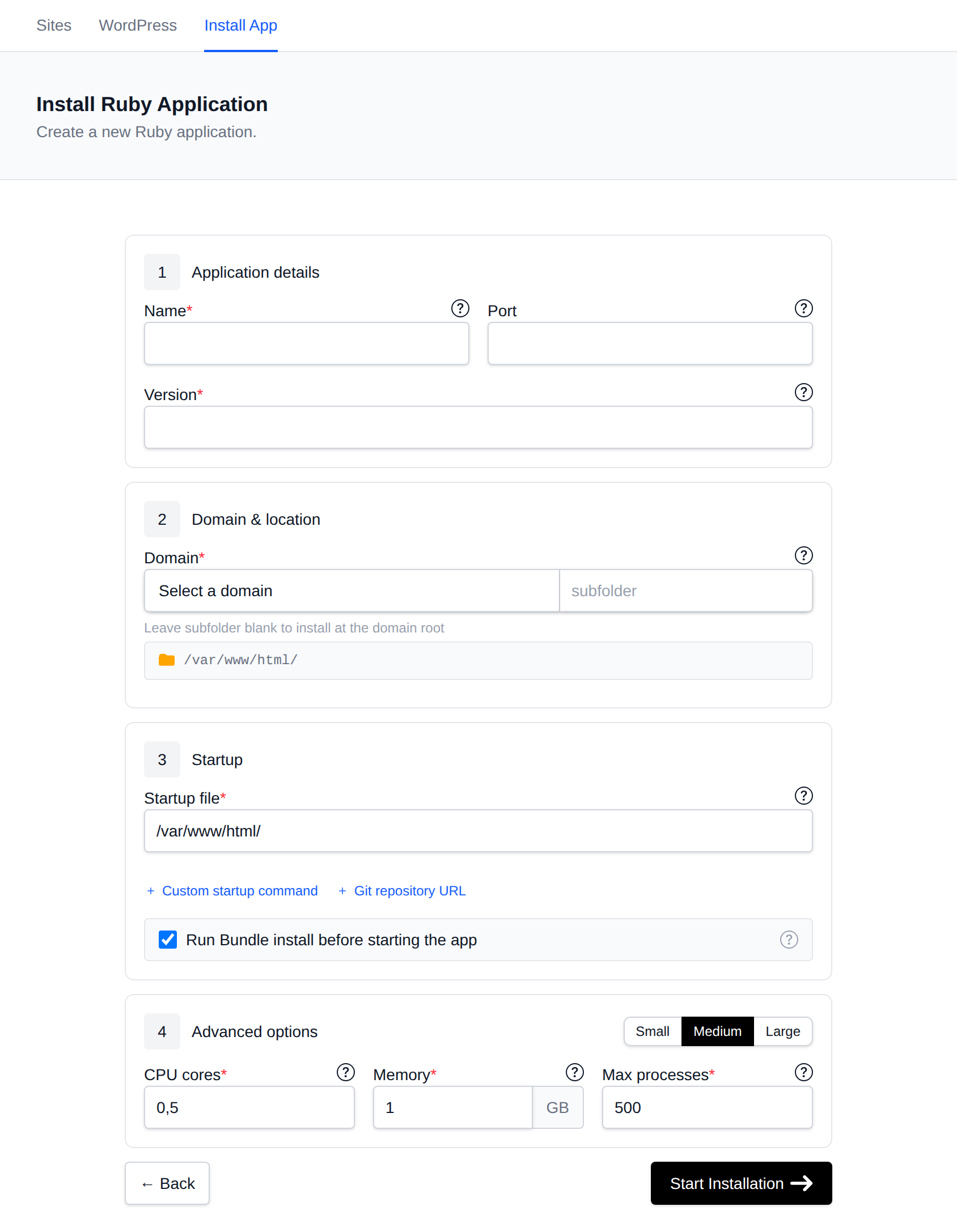
Create the app in OpenPanel → Websites → Install App → Setup Ruby Application:
| Field | Value |
|---|---|
| Domain | example.com |
| Port | 3000 |
| Startup File | app.rb |
| Version | a current Ruby version |
| Run Install | ✅ runs bundle install |
Ruby on Rails
Prepare the project
In config/environments/production.rb, make sure Rails trusts the proxy and serves static files:
config.assume_ssl = true          # OpenPanel terminates SSL in front of the app
config.force_ssl = true
config.public_file_server.enabled = true
config.hosts << "example.com"
Configure the database in config/database.yml (production) - the host is the service name, not localhost:
production:
  adapter: mysql2        # or postgresql
  host: mysql            # "mariadb" for MariaDB, "postgres" for PostgreSQL
  database: user_myapp
  username: user_myapp
  password: <%= ENV["DATABASE_PASSWORD"] %>
Create the database and user first in OpenPanel → MySQL → Database Wizard.
Environment variables
Create a .env file in the project folder (loaded with the dotenv gem) or set the values in config/credentials:
RAILS_ENV=production
SECRET_KEY_BASE=generate-with-bin-rails-secret
DATABASE_PASSWORD=strong-password
Create the application
| Field | Value |
|---|---|
| Domain | example.com |
| Port | 3000 |
| Startup File | config/application.rb (any .rb file - the custom command below is what runs) |
| Custom Startup Command | bundle exec rails db:migrate && bundle exec rails assets:precompile && bundle exec puma -b tcp://0.0.0.0:3000 -e production |
| Run Install | ✅ runs bundle install |
| CPU / Memory | 1 core, 1 GB or more |
Asset precompilation on every start makes restarts slower. For bigger apps, precompile assets locally or in CI, upload public/assets, and remove assets:precompile from the command.
Ruby versions from the dropdown use the full official ruby image, which includes compilers and database client libraries, so gems with native extensions like mysql2, pg and nokogiri install normally.
Deploy from Git
Enter an https:// Git repository URL when creating the app. On every start, the container fetches the latest commit of the default branch - push your changes, then Restart the app.
Managing the App
In OpenPanel → Websites → Sites, click Manage to start, stop or restart the app, view Logs, edit the Gemfile and run Bundler under Install Packages, and change the Ruby version, startup command and resource limits under Overview.
More: Ruby applications.
Troubleshooting
| Problem | Fix |
|---|---|
| 502 Bad Gateway | The app isn't running or listens on 127.0.0.1. Bind Puma to tcp://0.0.0.0:3000 and check Logs. |
Blocked hosts: example.com | Add the domain to config.hosts. |
| Redirect loop | Set config.assume_ssl = true. |
Can't connect to local MySQL server | Use host: mysql in database.yml, not localhost. |